Saturday, September 15, 2007

Photoshop® Lightroom™ 1.2 and Photoshop Camera Raw 4.2 plug-in Released

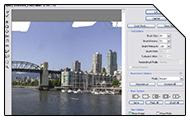
+ Adobe has released Version 1.2 of Photoshop® Lightroom™ and Version 4.2 of Photoshop Camera Raw plug-in, both available for imediate download from adobe.com. The updates offers Additional camera support for the Canon EOS 40D, Fuji FinePix IS-1, Olympus EVOLT E-510, Panasonic DMC-FZ18, and more. Beside additional camera support, Adobe® Photoshop® Lightroom® 1.2 update includes Corrections for several issues including XMP auto-write performance, Windows Vistaᆴ grid display errors, and noise reduction for Bayer patterned sensors.
The camera raw functionality in Adobe® Photoshop® software provides fast and easy access within Photoshop to the "raw" image formats produced by many leading professional and midrange digital cameras. By working with these "digital negatives," you can achieve the results you want with greater artistic control and flexibility while still maintaining the original "raw" files.
>> Camera Raw 4.2
Macintosh ][ Windows®
>> Lightroom 1.2
Macintosh ][ Windows®

Sunday, August 12, 2007

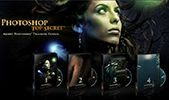
Photoshop® Top Secret - Training DVD


+ New Photoshop Tutorial DVD by photoshop vetran
Mark Monciardini has been released. This student-friendly home study course includes four DVD-ROMs with over 16 gigabytes of photoshop video tutorials and project files. Author claims; The course will teach you how to become the ultimate Photoshop® "black belt" for fun and/or profit. You'll learn how to create top-level special effects for eye-catching movie posters, album covers, book jackets, brochures, mailing pieces, magazine covers, article illustrations, and a tremendously wide range of print ads and Web site graphics.

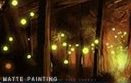
Matte Painting Photoshop Tutorial For Beginners

Matte Painting Photoshop Tutorial
+ CGIndia, has published a new matte painting tutorial for photoshop users. This photoshop tutorial is created by CG Artist shailesh pahuja who shows you; How to easily create Digital Matte Painting using Adobe Photoshop. This is quite easy tutorial to learn, but a basic know-how of Photoshop (or equivalent software) is required.
>>
Matte Painting Tutorial

Monday, July 23, 2007

Photoshop Brushes - fireworks, Swirls and Skulls


+ Some new and free Photoshop brushes to play with, while enhancing your graphic illustrations at the same time.
fireworks and Swirls
These two brush packs are designed by digital artists and brush designer Stephanie Shimerdla. Using firework brushes you can create some awesome n realistic "fireworks display" backgrounds etc. While Swirls is a set of brushes made up of various swirls, ornamental designs, and flourishes. Most of these will work great as corner brushes.
>> Download fireworks / Download swirls
Skulls - High Res. Brushes
Skulls brushes is high resolution free Photoshop Brushes set created and shared by Digital Design Cottage. This brush set has 6 high resolution brushes featuring skulls in different styles. The Photoshop brushes in this pack is about 2000 pixels wide and can be used for prints.
>> Download Skulls brushes

Microsoft HD Photo Plug-in for Adobe Photoshop

+ A file format plug-in to add HD Photo open/save support to Adobe® Photoshop® software. HD Photo offers compression with up to twice the efficiency of JPEG, with fewer damaging artifacts, resulting in higher-quality images that are one-half the file size. In addition, HD Photo offers increased image fidelity, preserving the entire original image content and enabling higher-quality exposure and color adjustments in the image. This new format offers the ability to decode only the information needed for any resolution or region, or the option to manipulate the image as compressed data.
This is the Windows BETA release of the HD Photo file format plug-in forAdobe® Photoshop® software with an updated EXPIRATION Date. It supports a wide range of pixel formats (including high dynamic range, wide gamut formats) and numerous advanced HD Photo features.This BETA plug-in is designed for use with the CS2 or CS3 versions of Adobe Photoshop software running under Microsoft Windows XP or Microsoft Windows Vista. Any other use is not supported. Because this is a Beta release, we recommend you use careful judgment before using this version of the plug-in for any production work. This Beta version will expire after August 30, 2007.
>> Download HD Photo Plugin

Thursday, July 19, 2007

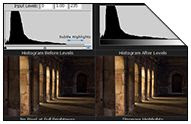
Using "Levels" in Photoshop


+ Just stumbled upon this great photoshop tutorial, which gives you a detailed insight on using Levels tool in Photoshop for enhancing lighting in any digital images. This is a very handy tutorial for photographers / image editing professional and can be used with other image editing programs. Basically the levels tool can move and stretch brightness levels in a histogram using three main components: a black point, white point and mid-tone slider. The position of the black and white point sliders redefine the histogram's "Input Levels", so they are mapped to the "Output Levels" (default is black (0) or white (255), respectively), whereas the mid-tone slider redefines the location of middle gray (128).
Using "Levels" in Photoshop - Tutorial Link

Animated gif from a quicktime movie


+ In this useful photoshop tutorial, Alan Hettinger shows you; how to easily create Animated gif from any quicktime movie. The process you learn in this tutorial can be used for creating various forum avatars and web graphics.
Snippet:"This tut will teach you how to make an animated gif from a quicktime movie. This is great for forum avatars or buddy icons. First choose a movie trailer with a scene you would like as your animated gif. I have selected the flying bats from Batman Begins. With your Quicktime movie open, and Photoshop open, go through the following steps."
Animated gif from a quicktime movie - Tutorial link

Monday, July 9, 2007

ADC Photoshop Brushes - Underwater

+ Some free photoshop brushes by the courtesy of Art Design Center. The free brush pack features Several large brushes based on pictures of underwater scenes. The PS brushes are Compatible Photoshop CS and above.
Download ADC - underwater Brushes

EXPOSÉ 5 Available

Source: cgindia.org
+ Ballistic Publishing has started shipping of Expose 5 , the fifth in its series of award-winning EXPOSÉ digital art books celebrating the creative talents of digital artists worldwide. Judged by an international team of industry leaders this year’s edition features 298 examples of the world’s best digital art prepared by 218 artists from 45 countries. For more information and preview of book, please visit - ballisticpublishing.com

Thursday, July 5, 2007

Stefan Lucut | Featured Digital Artist


+ Have a look at the awesome portfolio of Stefan Lucut, a very young and talented freelance Graphic Designer based in Romania. He has recently updated his website, which features his commercial as well as personal work in multiple categories such as Print, Identity, Motion Graphics etc. Its quite hard for me to define his style, which changes with every illustrations he makes........So let the Art do the talking.
Featured Digital Artist - Stefan Lucut

Thursday, June 28, 2007

Photoshop Lightroom 1.1

+ Adobe Systems Incorporated has announced the release of Photoshop Lightroom Ver. 1.1 update with added functionality and support for Windows Vista platform. The update is free for all Lightroom users and includes flexible image management for multi-computer workflows, improved noise reduction and sharpening technology, Windows Vista™ compatibility, and more. For more information about Photoshop Lightroom, please - click here!

Friday, June 15, 2007

Interactive Panoramas with Photoshop CS3 and PTViewer


+ Another very handy tutorial about creating Interactive Panoramas using CS3 and PTViewer. Scott Onstott explains how easily you can make great panoramas using Photoshop automate command Photomerge and few more simple steps. This tutorial in one way or another proves the advantage of using Photoshop CS3 over CS2, because although the ability to stitch multiple photos together was present in Photoshop CS2, it wasn’t all that great. To make things interactive Scott uses PTViewer, an free and open-source software initially developed by Helmut Dersch.....Now visit the tutorial link to know how to make an interactive panoramas in few simple steps -> Tutorial Link

Saturday, June 9, 2007

Photoshop Tutorial - Changing hair color


+ Just found this very useful and handy Photoshop tutorial, which helps you change the appearances of your loved one or may be help you decide your new look. Anyways, In this tutorial author explains how to change color of hair in any image. As you must have imagined the most pain taking or tricky part is to select the hair, so in this handy
, author will show you not only, how-to easily select the hair using quick mask, but also how to change its color.
Photoshop Tutorial -
changing hair colour

Power Retouche Photoshop plugins


+ Their are hundreds of Photoshop Plugins pack available and many claims to be very professional, but very few are quite up to their claimed standards and one of them is "Power Retouche", a real comprehensive set of for graphic artists, photographers and image editing professionals. The Power Retouche Plugins bundle offers a set of 25 very easy to use and quite flexible filters for your usual bread butter photo-editing jobs on daily basis, to quite tedious image enhancement functions. Equalizer, Lens Corrector, Sharpness Editor, Black definition Contrast and saturation Editor are the most note-worthy among the long list of Photoshop filters, which really extends the functionality of Photoshop to another level. Power Retouche V.7.1 is fully compatible with Photoshop CS3 as well as prior Photoshop’s and full support for 16 BIT, 48 BIT, 64 BIT modes.
Download Power Retouche Trial - (
Win) (Mac)
Read more about -
Power Retouche

Tuesday, June 5, 2007

PixelGenius Release Candidates for CS3 and CS3 Extended

+ PixelGenius has announced the release "RC" versions of their best-selling photoshop plugins; PhotoKit, PhotoKit Sharpener and PhotoKit Color 2.0. for Photoshop CS3. These RC versions are considered "not yet complete" in that while we have tested them and find them to work in the final release version of Photoshop CS3, there are still certain issues that will need to be addressed for both Mac and Windows- see the download page for details.

Digital-Tutors Released Photoshop® CS3 Training

New training addition provides a comprehensive guide to getting started and learning creative techniques with Photoshop CS3
+ Oklahoma City, OK (June 5, 2007) - Digital-Tutors, an Adobe® Certified Expert, today announced the availability of 'Introduction to Photoshop CS3' - the latest release in a growing library of interactive training for emerging digital artists using Adobe Photoshop CS3. 'Introduction to Photoshop CS3' provides 6 hours of project-based training and teaches artists a non-destructive workflow to image editing in Photoshop CS3 and time-saving techniques to help artists finish projects with less time and greater creativity - an ideal training solution for artists in Print, Web, Multimedia, and Design.
"Photoshop is considered an industry-standard tool, which can make learning the new features, tools, and workflows often intimidating for artists entering the industry," said Tony McMillan, Motion Graphics Designer at Digital-Tutors. "Digital-Tutors is happy to make learning robust software such as Photoshop CS3 less difficult with a series of intuitive projects developed to increase the viewer's understanding of the software and how to use the tools to achieve the results they seek with as little time as possible. This latest release is great for those new to Photoshop CS3 and also experienced artists upgrading to the latest version," added McMillan.
Highlights from 'Introduction to Photoshop CS3' include: comprehensive tool and palette overviews, workflows for Print, Web, and Design, utilizing a non-destructive workflow, managing multi-layer documents, creating effects, restoring photographs, enhancing photographs, color adjustments and correction, utilizing automation scripts, creating actions, building web galleries, using the new Photomerge, using Bridge, working with camera raw images, compressing images for web, working with Smart Objects and Smart Filters, importing Adobe Illustrator files, bonus lessons for Photoshop CS3 Extended, and additional lessons developed to increase one's understanding of Photoshop CS3.
For a full outline and pricing information of 'Introduction to Photoshop CS3' -
Click Here!

Thursday, May 31, 2007

Photoshop Plug-In for Google 3D Warehouse Now Available for Download

Software Add-On Delivers Direct Access to Google’s Free 3D Content
+ Press Release: SAN JOSE, Calif. — May 31, 2007 — Adobe Systems Incorporated (Nasdaq:ADBE) and Google Inc. (Nasdaq: GOOG) today announced the Photoshop® CS3 Extended plugin for the
Google 3D Warehouse, enabling Adobe® Photoshop CS3 Extended users to take further advantage of the software’s powerful compositing, painting and image-editing toolset for editing 3D content. With the plug-in, users will be able to query and download free 3D content from the Google 3D Warehouse, Google’s free online repository for 3D models and content, directly within Photoshop CS3 Extended. 3D Content then can be placed, manipulated and used in composites with the new 3D tools in Photoshop CS3 Extended.
The Google 3D Warehouse is a free Google service which allows anyone to search for and download 3D models and content via a standard Web browser and now, with this plug-in, CS3 Extended. Users can also submit their own models to share within the community by uploading them from Google SketchUp into the 3D Warehouse. Models include everything needed for a 3D world, including: buildings, houses, bridges, statues, sculptures, couches, cars, people, pets and more. If the model has a location on earth, such as a building in New York city, you can also download and view it in Google Earth.
The plug-in is available for free download from the Adobe Labs Web site at http://labs.adobe.com.

Wednesday, May 30, 2007

Photoshop Tutorial - TOON Rendering


+ Well, this is quite old but very handy Photoshop tutorial by CgArtist Adam Baroody. In this tutorial Adam explains how to toon render your 3d model. Basically we learn how to process Falloff Shader Pass image in Photoshop, for creating the inked line art layer that will be composited over the Toon Paint Pass. The tutorial is quite useful of 3d artists but every one can learn a tip or two from this tutorial...so guys have a look.

Sunday, May 27, 2007

Photomatix Tone Mapping Plugin For Photoshop CS3


+ Photomatrix is a stand-alone application to create HDR image by Increasing the dynamic range of your photographs. Photomatrix offers two methods for fixing blown out exposure and flat shadows; Exposure Blending and Tone Mapping. Now you can use Tone Mapping function of Photomatrix pro with-in Photoshop only. HDRsoft Tone Mapping plugin for adobe Photoshop CS2 and Photoshop CS3 is available for Window / Mac both and works on 16-32bit images. This plugin is quite useful for photographers and images editing professionals for not only creating HDR images but to improve underexposed and dull images. The trial version of plugin is fully functional and never expires, but applies a watermark to the final image.

Fluid Mask 3 Public Beta Download

Vertus Quotes: "Quick to pick up and intuitive to use, Fluid Mask 3 gets professional results fast".
+ Vertus Fluid Mask 3 Public beta has been released and available for download. Fluid Mask by Vertus has been the first choice of most image editing professionals round the globe, and now with launch of version 3.0 Vertus extend and add more functionality to Fluid Mask, while taking image masking to the another level. Fluid Mask now comes as stand-alone as well as a plugin, for popular image editing and graphic software Adobe Photoshop (CS2/CS3).
The Key new features in Fluid Mask 3.0 includes:
- Faster initial image processing: 10% (single core) - up to 40% (dual core)
- Localized edge detection and blending: for faster workflow
- Better blending: especially for hair and problem edges
- Great new tools for fine mask selections
- workflow enhancement
.............and many more performance enhancing features. Currently Fluid Mask 3.0 is released for windows XP / Vista and their website suggest they will be launching a Mac version soon!

Free Vectors Download


+ Download a basket full of Vector arts, free of cost from Vecteezy.com. This site indexes free vectors in many formats such as adobe illustrator's .ai, CorelDraw’s .cdr, Etc. and made by designer from all over the world :)
Download link

Friday, May 25, 2007

Artizen HDR Plugins for Photoshop


+ Supporting Computers Inc. has released Artizen HDR Plugins for Photoshop and a demo version is now available for download. This package now has all 10 tone mapping operators included in Artizen HDR as well as the Orton Filter. text from Artizen website; "Supporting Computers Inc. has now taken all of it's Tone Mapping Operators from Artizen HDR stand-alone and put them together into a Photoshop HDR Plugin Package. Now the world's most popular image editor is merged with the world most powerful HDR plugin package. In addition to this the Orton method has found a lot of popularity when in conjunction with HDR, so Supporting Computers Inc. has also included Artizen's Orton method. This ensures that whether you want a realistic or stylistic result this package will meet all of your requirements." The Artizen Photoshop HDR Plugins is compatible with Photoshop 7/CS/CS2 / CS3 and supports 8,16, and 32bit Mode.

10 Tips for Photoshop Lightroom 1.0

+ Layers Magazine has published ten great Tips to get you started in Adobe Photoshop Lightroom 1.0. Incase you are still unaware about Photoshop Lightroom?...Photoshop is adobe's new image editing software developed particularly for professional photographers. text from Layers Mag: "T Is for Toolbar. Pressing the letter T on your keyboard hides the toolbar that appears at the bottom of the Preview area, and pressing T again makes it visible. However, if you’d like to hide it temporarily (which is handy for taking a quick, uncluttered look at your photo), then press-and-hold T and the toolbar only hides as long as you have the letter T held down. Rate Photos Quickly When applying star ratings to photos in the Library module, if you hold down the Shift key while applying your rating, it will automatically move you to the next photo. So, if you press Shift-4, rather than just 4, it assigns a 4-star rating to the current photo and then immediately brings up the next photo".
Check these handy tips by Layers Magazine which helps you get started with Adobe Photoshop Lightroom in no time...........
10 Tips for Lightroom!

Snap Art for Photoshop

+ One of finest plugins set by Alien Skin software’s among their list of products, which also includes Eye Candy - a well known set. Snap Art which released in December of 2006, is a handy set of Photoshop plugins for creating natural media artwork in a single step. Graphic Artists, photographers, and designers can now give a hand-crafted look to any digital image. Snap Art render any image in an unlimited variety of real-world art styles including oil paint, pencil sketch, pen & ink, comics, and more. Great for stylizing images or graphics, Snap Art works without laborious step-by-step editing and is more versatile than Actions or brushes.
Snap Art uses edge detection method to discern the objects, edges, lines, and shapes of an original image. Then, using this outline, an advanced paint engine strokes and fills this outline using the brushes and colors you specify in the options. Snap Art comes Loaded with hundreds of settings for producing stunning effects in a single step. Simply use the default setting that works for your image or use detailed controls to fine-tune a composition for the desired effect.
For checking the Examples and demo download, please visit this link -
Snap Art download!

CommArts Design Competition

+ Well slipped off my radar earlier, but still five days left to submit your entry in Communication Arts Magazine's Competition for Design category ; Deadline: June 1, 2007. While the deadline in the illustration Category is March 11, 2008. Its your time to Gain worldwide recognition for your finest work by entering the most prestigious juried competitions for graphic design and advertising. If selected, your award-winning pieces will be reproduced in Communication Arts 2007 Design Annual or Advertising Annual. Over 70,000 copies of each Annual will be in circulation worldwide, guaranteeing you outstanding exposure to potential clients and colleagues.
Submit your Entry!

25% Discount on Vector Packs!


+ On coming monday and tuesday, you can get 25% discount on entire order of recently featured Arsenal Vector Packs by Gomedia. So on those two days only, if customers enter the code: memday07 , they will get 25% off their entire order.

Get 25% Discount on Vector packs!

Tuesday, May 22, 2007

Adobe Photoshop CS3 for Photographers


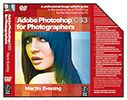
+ Focal Press has released Adobe Photoshop CS3 for Photographers, the book by Martin Evening. This is the forth book in 'Adobe Photoshop for Photographers' titles series by Evening and have become a Photoshop reference bible for photographers. Adobe Photoshop CS3 for Photographers book contains a wealth of practical advice, hints and tips-n-tricks to help you achieve very professional looking results. A DVD also comes along with the book, which contains a help guide and 110 minutes of movie tutorials on Photoshop CS3. The DVD also contains a 33 page PDF documenting all the Adobe Photoshop and Adobe Bridge shortcuts, a 26 page PDF on digital capture and over 100 sample images to experiment with.
The book's Official website

Free Photoshop Brushes by damnedinblack

+ Who ant’s like free stuff? So, this time PSnode bring you some more useful set of Photoshop brushes by damnedinblack . These set of brushes are pretty much unconventional in design but i am sure you will find them quite handy while make your illustration. You will get brushes like barcode, butterfly, spikes, trees, handwriting, fairies, insects and many more. In different sets, their are more than 80 brushes available to download.

Free Photoshop Brushes | Hot-N-Handy


+ We bring you some hot and handy Photoshop brushes for free download by courtesy of Stephanie Shimerdla, who has made these awesome brushes. Their are more than 50 brush sets with about 30 brushes per set, available for free download. You may also like to download some shapes and learn from the handy "how to" tutorials written by Stephanie. We will be bringing more n more free brushes for you, we just have started....so do check PSnode time-to-time!
Anyways herez da - Download Link!

Arsenal Vector Packs - yor professional design weaponry!

+ Jazz Up your illustration using these stunning ready to use Vector Art packs, designed by GoMedia, a progressive art and design studio based in Cleveland, Ohio that delivers outstanding creative solutions to their clients across the globe. These ready to use vector art comes handy time to time; when you want to add an extra punch in your . These Vector packs can be used with adobe Illustrator, and Corel Draw, while in Photoshop you need to rasterize them. You may also create some handy custom brushes using these awesome vector shapes for adobe Photoshop. Their are many arsenal vector packs available, grouped together in different categories like Flames, Edges, Skulls, Halftone Circles , URBAN , Bugs, architecture pack and many more. A single pack starts from as low as 14.99USD/- and heavy discount available when you buy in bundles. Many stunning packs to choose from and a must have design arsenal for any professional illustrator or graphic designer....hmm, now what are you waiting for???
You can grab your Professional design weaponry here -
Arsenal Vector Packs !!

Saturday, May 19, 2007

SiteGrinder - Plugin For Photoshop

+ SiteGrinder is a great Photoshop Plugin that converts Photoshop designs to web sites. It is smart. It has many features. It is easy to use. It simply rocks! Start making websites without having to learn HTML, CSS, or a whole new development application. SiteGrinder has full featured gallery support.
Stop wasting time doing the tedious monkey work of slicing and reconstructing what has already been done in Photoshop. A pre-made web template seems like a great way to save time until you need to customize it. But with SiteGrinder a click turns the template into a full site. SiteGrinder is a Photoshop plug-in that you use from with-in Photoshop. It understands your design, it knows how web pages should be built, it builds them for you. Just name your Photoshop layers with some “hints” and SiteGrinder will figure out what to do and do it. SiteGrinder doesn’t just build pages, it can build entire sites. It supports styled text conversion, scrolling text, hyperlinks, drop down menus, full support for galleries, forms, contact forms, Flash slideshow creation, and much more.
Buy or Download demo of -
SiteGrinder 2.0